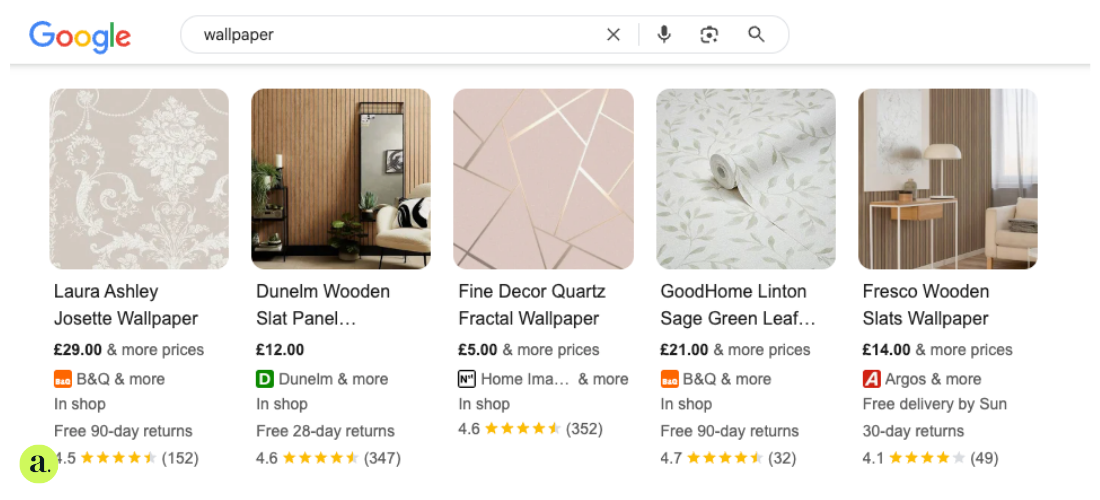
Get seen. Get clicks. Get sales.
Google Shopping takes up over 85% of clicks from retail searches. But if your product feed isn’t pulling its weight, you’re not just wasting budget, you’re handing those clicks to your competitors.
Here’s how to sharpen up your feed, boost visibility, and get the most from every penny you spend.
Keep your feed fresh or risk being ignored
Your product feed isn’t something you set once and forget. It should be updated daily. If prices, stock, or availability change and your feed doesn’t reflect that, you’ll run into disapprovals or worse, customers clicking through only to find an out-of-stock item.
Automate what you can. Use feed rules to pull in colours, assign product categories, or add custom labels like ‘Low Stock’, ‘Winter Range’, or ‘Top Seller’. Then sync regularly with Google Merchant Centre so any issues get flagged early, not after a week of wasted spend.
Titles are your keywords in disguise
You can’t manually choose keywords in Shopping campaigns, but your product titles do all the talking. Front-load them with the good stuff: brand, product type, size or colour — whatever shoppers are likely to search.
Do your keyword research and naturally work high-volume terms into your titles. No filler. No fluff. Just a clear description that helps Google understand what you’re selling and makes shoppers want to click.
An optimised title can drive more than double the clicks. Low effort. Big reward.
Product descriptions should do more than tick a box
Treat your product descriptions like a second chance to tell Google what your item is - and convince real humans it’s worth buying.
Keep it focused on the actual product, not the full range. Add supporting keywords that didn’t fit in the title. Use clear, persuasive language like “Order online today” or “Delivered fast across the UK”.
Tailor the tone to the platform. Google Shopping, Amazon, eBay - each has its own vibe. Match it.
Images that look good on mobile win every time
Shoppers don’t read before they click. They look at the picture. If it’s blurry, cluttered, or branded to death, they’ll scroll right past.
Use high-resolution images with a plain white background and the product front and centre. Ditch the watermarks, logos, and props. And always check how your images look on mobile — that’s where most clicks are coming from.
Test different angles or setups to see what drives more engagement. It’s not just about being pretty. It’s about getting chosen.
Don't skimp on attributes - they do the heavy lifting
Google relies on structured data to match your products to the right searches. If your feed’s missing key attributes, your ads are either going to underperform or not show at all.
At the bare minimum, make sure you’ve got titles, descriptions, pricing, availability, product URLs, image links, brand info, and identifiers like GTINs or MPNs. For clothing, homeware or tech, also include colour, size, material, and pattern.
Before peak seasons like Black Friday, double-check everything. A rejected feed during your busiest month is the last thing you need.
Smarter feed structure means smarter strategy
How your feed is organised directly affects how well your campaigns run. If everything’s lumped together, you’re flying blind.
Segment your feed by product type, performance, margin, or season. Use custom labels to flag bestsellers, promo items, or low stock. This gives you control over bidding, budgets, and reporting, and makes it easier to scale what’s working.
Campaigns built on a strong feed foundation always outperform the ones thrown together in a rush.
Break down ad groups for better control
If you’re running a large catalogue, create tighter ad groups. One group for premium products, another for clearance lines, and another for your seasonal range. This lets you tailor bids, monitor performance, and protect budgets across different product sets.
It’s especially important in industries like fashion or beauty, where product performance varies massively. Give your best stuff the spotlight it deserves.
Use negative keywords to cut out the rubbish
Shopping campaigns don’t let you pick the keywords you want. But you can block the ones you don’t.
Add negative keywords to stop showing for irrelevant or low-intent searches. Keep an eye on your search term reports and prune anything that’s eating budget without converting. It’s one of the simplest ways to improve click-through rate and ROAS.
Let smart bidding take over (when the time's right)
Once your feed is in shape and conversions are rolling in, hand-bidding over to Google’s Smart Bidding.
It uses real-time signals like location, device, time of day and audience intent to adjust bids on the fly. Great for accounts with consistent data and a clear goal, whether that’s volume, ROAS or total value.
Just make sure the feed is clean before you switch it on.
Keep optimising long after you go live
Your feed isn’t “done” once it’s live. Keep tweaking, testing, and reviewing.
Use analytics to spot top performers, identify slow movers, and adjust bids or titles based on real data. Change things up ahead of seasonal peaks. Try new images. Swap out underperforming descriptions. Check how your products look on different devices.
Google’s machine learning can do a lot, but it can’t fix a messy feed. That bit’s on you.
FAQs
How do I optimise a product feed?
Keep it updated daily. Structure it cleanly. Use smart titles, and quality images, and monitor performance often.
What’s the most important part of the feed?
The title. It drives visibility and determines what kind of searches you appear in.
Can I test different versions of product data?
Absolutely. Try new titles, images, descriptions or campaign structures to see what works best.
Is Smart Bidding always the best approach?
It’s brilliant for scale, but only when your feed is solid and conversions are coming in reliably. Otherwise, start manually and build from there.