
Facebook Marketing for Shopify: Strategies That Actually Work
Unleashing Shopify Sales Growth with Facebook Marketing
In the hyper-competitive world of eCommerce, driving consistent, profitable sales to your Shopify store is the ultimate measure of success. While new platforms constantly emerge, one giant remains a non-negotiable powerhouse for customer acquisition and revenue growth: Facebook. The challenge for today's merchants isn't whether to use it, but how to use it effectively. A scattered, "boost post" approach leads to wasted ad spend and dismal returns. A strategic, data-driven Facebook Marketing plan, however, can transform your Shopify store from a side project into a thriving, scalable business.
Why Facebook (Meta) Remains Indispensable for Shopify Merchants
Despite shifts in the digital landscape, Meta's family of apps (Facebook and Instagram) offers an unparalleled combination of massive user scale and sophisticated targeting capabilities. With over 2.9 billion daily active users across its platforms, your ideal customer is almost certainly there. For Shopify stores, this translates into the unique ability to find, engage, and convert niche audiences with surgical precision. The platform's deep, native integration with Shopify simplifies everything from product catalogue syncing to conversion tracking, creating a streamlined and powerful ecosystem built for eCommerce success.
The Power of Proven Strategies: From Awareness to Direct Sales
Successful Facebook advertising isn't about finding a single "hack." It's about implementing a series of proven, interconnected strategies that guide a potential customer from initial discovery to their first purchase and beyond. This involves building a solid technical foundation, understanding your audience on a deep level, and deploying campaigns that speak to customers at every stage of their buying journey. The Facebook ad strategies outlined here are designed to move beyond vanity metrics like likes and shares to focus on what truly matters: driving tangible sales and maximising your return on ad spend (ROAS).
What You’ll Learn: A Roadmap to Driving Tangible Revenue
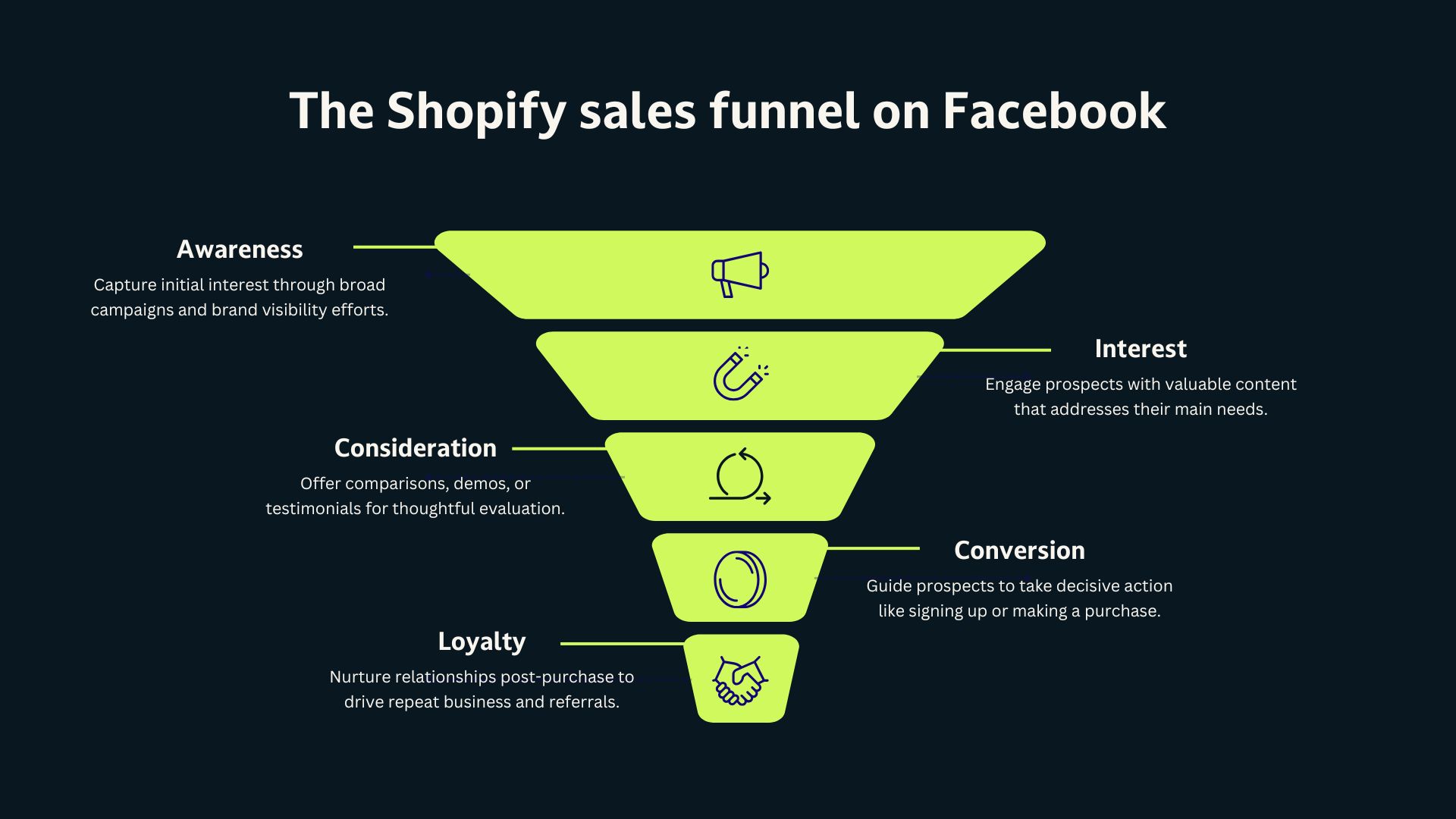
This article provides a clear, actionable roadmap for leveraging Facebook to grow your Shopify sales. We will move beyond theory and dive into seven specific strategies that cover the entire marketing funnel. You'll learn how to establish a flawless technical setup, master audience targeting, recover lost sales with powerful retargeting, and leverage unique platform features like Facebook Shops and Facebook Stories to build a loyal customer base. By the end, you'll have a strategic framework to turn your advertising efforts into sustainable growth for your Shopify store.
Strategy 1: Master Your Foundation for Conversion: The Non-Negotiables for Sales Success
Before you even think about launching your first Facebook ad campaign, a solid technical foundation is non-negotiable. Skipping these foundational steps is like building a house on sand - it’s destined to crumble. This essential groundwork ensures accurate sales tracking, unlocks powerful advertising features, and creates a seamless, professional experience for both you and your customers.
Setting Up Your Meta Business Suite for Seamless Operations and Sales Tracking
Your Meta Business Suite (formerly Business Manager) is the central command centre for all your marketing and advertising activities. It allows you to manage your Facebook Page, Instagram profile, ad accounts, pixels, and product catalogues in one secure, organised location. Setting it up correctly from day one provides a clear separation between personal and business assets, enables you to grant secure access to team members or agencies, and consolidates all your data and reporting tools, giving you a clear view of your campaign performance.
Installing and Verifying Your Meta Pixel for Accurate Conversion Tracking and Retargeting
The Meta Pixel is a snippet of code that acts as the brain of your advertising efforts, connecting your Shopify store directly to Facebook. It's the engine behind effective advertising, tracking every action a visitor takes on your site—from viewing a product to adding an item to their cart and, most importantly, making a purchase. Installing the Pixel via Shopify's native "Facebook & Instagram" sales channel app is straightforward. Once active, it feeds crucial data back to Facebook, enabling you to:
-
Measure the true return on your ad spend (ROAS).
-
Optimise campaigns automatically for conversions.
-
Build powerful custom audiences for high-performing retargeting ads.
Domain Verification: Building Trust and Unlocking Key Ad Features for Shopify Stores
Domain verification is a simple process that proves to Facebook that you own your Shopify store's domain. This step is critical for building trust and is now mandatory for configuring Pixel conversion events, which are the backbone of running conversion-focused campaigns. Verifying your domain protects your brand's integrity from misuse, allows you to prioritise which conversion events are most important (like "Purchase"), and ensures you have full, uninterrupted access to Facebook's most essential advertising tools.
Optimising Your Shopify Product Catalogue for Facebook: The Backbone of Dynamic Ads and Shops
Your Shopify product catalogue is the fuel for some of Facebook’s most powerful eCommerce features, including dynamic ads and Facebook Shops. By connecting your catalogue via the sales channel app, you create a seamless sync that keeps your product information (pricing, availability, images) up-to-date across platforms. To maximise its impact, ensure your Product Titles are clear, descriptive, and keyword-rich. Your Product Descriptions should be compelling, benefit-driven, and easy to scan. This optimisation is crucial, as this is the exact information that will automatically populate your dynamic product ads and shop listings.
Understanding Facebook Ad Specifications to Prevent Delays and Maximise Reach
Every ad placement on Facebook, from the Feed to Facebook Stories, has specific creative requirements. Understanding these Facebook ad sizes and technical specifications prevents your ads from being rejected, delayed, or displayed poorly. Adhering to recommended image resolutions (e.g., 1080x1080 for feeds, 1080x1920 for Stories), video lengths, and text limits ensures your creative looks professional and is optimised for each placement. This maximises its potential to capture attention, stop the scroll, and drive high-quality clicks to your Shopify store.
Strategy 2: Precision Audience Targeting: Converting Browsers into Buyers
The most brilliant, creative and compelling offer will fail if shown to the wrong people. Facebook's greatest strength is its ability to target users with incredible precision. Mastering the art of building and refining your Facebook Audience is the difference between burning your budget on uninterested users and efficiently acquiring high-value customers who are ready to buy.
Leveraging Facebook Audience Insights to Uncover High-Value Customers for Your Products
Facebook Audience Insights is a powerful research tool that provides aggregated, anonymised information about different groups of people on Facebook. You can analyse your current page followers, a custom audience of past purchasers, or the entire Facebook population to uncover invaluable data. Use it to discover demographic information (age, location, education), common interests, lifestyle attributes, and the other pages your ideal customers like. This intelligence is gold for your top-of-funnel campaigns, helping you find new pockets of potential buyers and informing your ad creative and messaging.
Crafting Core Audiences with Detailed Targeting: Interests, Behaviours, and Demographics That Signal Buying Intent
Core Audiences are the foundation of your prospecting campaigns and are built by selecting specific criteria to define your target market. Go beyond broad interests like "shopping." Think about what behaviours and life events signal buying intent for your product.
-
Selling baby products? Target users with interests in parenting blogs and a "Parents with newborns" demographic.
-
Selling high-end travel gear? Target interests like "Adventure Travel" and the "Frequent International Travellers" behaviour.
Layering these detailed targeting options allows you to create a highly relevant Facebook Audience that is much more likely to be interested in what your Shopify store offers.
Building Custom Audiences from Your Shopify Data: Website Visitors, Customer Lists, and Engagers
Custom Audiences are your most valuable targeting asset because they are made up of "warm" users who have already interacted with your brand. Using data from your Meta Pixel and Shopify customer lists, you can create distinct segments for your remarketing efforts, including:
-
Website Visitors: Anyone who has visited your site in a specific timeframe (e.g., last 30 days).
-
Product Page Viewers: People who have looked at specific products but didn't add to cart.
-
Add to Carts: A high-intent group that started the checkout process but didn't complete a purchase.
-
Past Purchasers: Your existing customer base, perfect for loyalty and cross-sell campaigns. These audiences are the cornerstone of the most effective Facebook ad strategies.
Expanding Your Reach with Lookalike Audiences: Finding New Buyers Similar to Your Best Customers
Once you have a strong Custom Audience (e.g., a list of your 500 best customers with the highest lifetime value), you can ask Facebook to find more people just like them. This is a Lookalike Audience. Facebook's algorithm analyses thousands of data points to find the common traits of your source audience and then builds a new, much larger audience of users who share those characteristics. Creating a 1% Lookalike Audience from your top purchasers is one of the most powerful and efficient ways to scale your Facebook ad campaign and find new customers.
Segmenting Audiences for Different Stages of the Sales Funnel
Don't use a one-size-fits-all approach to your advertising. The message that attracts a new customer is different from the one that convinces a cart abandoner. Segment your audiences based on where they are in the sales funnel:
-
Top of Funnel (Awareness): Use Core and Lookalike Audiences to introduce your brand to cold traffic.
-
Middle of Funnel (Consideration): Retarget website visitors, video viewers, and social media engagers who have shown initial interest.
-
Bottom of Funnel (Conversion): Focus on high-intent Custom Audiences like cart abandoners with direct, action-oriented offers.
This segmentation ensures your ad message, offer, and creative are always relevant to the user's level of familiarity with your brand, dramatically improving conversion rates and lowering Facebook ad costs.
Strategy 3: The Art of Retargeting: Recovering Abandoned Carts and Driving Repeat Purchases
Industry data shows that around 70% of online shopping carts are abandoned. Most visitors won't purchase from your Shopify store on their first visit. Retargeting is the process of serving ads specifically to people who have already visited your site, viewed a product, or added an item to their cart. It is consistently one of the highest-return-on-investment (ROI) Facebook ad strategies available to eCommerce businesses.
Implementing Dynamic Retargeting to Serve Personalised Product Ads to Engaged Visitors
Dynamic retargeting is an automated and highly effective form of advertising that every Shopify store should be using. By leveraging your connected product catalogue and Meta Pixel, Facebook can automatically show ads featuring the exact products a user viewed or added to their cart on your Shopify store. These personalised retargeting ads are incredibly relevant, serving as a powerful, timely reminder that recaptures lost interest and drives users back to complete their purchase. This is one of the most powerful Facebook ad types for eCommerce.
Segmenting Your Retargeting Audiences for Maximum Impact: Cart Abandoners, Product Viewers, and Past Purchasers
To maximise relevance and ROI, segment your retargeting audiences. Don't show the same ad to a casual browser and a cart abandoner. Create distinct ad sets or campaigns for:
-
Cart Abandoners (last 3-7 days): This is your highest-intent group. Target them aggressively with a compelling offer like a small discount or free shipping to nudge them over the finish line.
-
Product Viewers (last 7-14 days): This group showed specific interest. Remind them of the products they viewed using dynamic ads and highlight key benefits or social proof like customer reviews.
-
Past Purchasers (last 30-180 days): This audience is primed for repeat business. Show them new arrivals, complementary products, or loyalty offers to increase their lifetime value.
Crafting Compelling Retargeting Ad Creatives and Offers That Drive Immediate Action
Your retargeting ad creative and copy must acknowledge the user's prior interaction to be effective. Use dynamic language like "Still thinking it over?" or "Complete your order!" For dynamic ads, the product image is the star, so ensure your photography is top-notch. For other retargeting segments, use customer testimonials, user-generated content, or short videos that overcome common objections. A time-sensitive offer ("Your 10% discount expires tonight!") can create the urgency needed to drive an immediate sale.
Nurturing Past Purchasers for Loyalty and Increased Customer Lifetime Value
Your existing customers are your most valuable asset. It's far more cost-effective to retain a customer than to acquire a new one. Use retargeting to nurture your past purchasers by announcing new product launches, promoting seasonal sales, or cross-selling related items. By keeping your brand top-of-mind and providing ongoing value to those who have already bought from you, you transform one-time buyers into loyal, repeat customers, significantly increasing their lifetime value (LTV).
Strategy 4: Unlock Direct Sales with Facebook Shops: Your In-App Storefront for Shopify
Facebook Shops allows you to create a native, mobile-first storefront directly on your Facebook Page and Instagram profile. It’s a powerful tool for Shopify merchants because it dramatically reduces friction in the buying process. Customers can browse collections and discover products without ever leaving the social media app, creating a fluid and seamless path to purchase.
Integrating Shopify with Facebook Shops for a Seamless Product Sync and Shopping Experience
The integration between Shopify and Facebook Shops is remarkably seamless through the "Facebook & Instagram" sales channel. Once connected, your Shopify product catalogue, including inventory, pricing, variants, and product details, automatically syncs with your Shop. This eliminates the nightmare of manual updates and provides customers with a consistent, reliable shopping experience, whether they are on your website or browsing your Facebook Shop.
Optimising Your Product Titles and Product Descriptions for Discoverability and Conversion within Facebook Shops
Just like on your Shopify store, well-crafted Product Titles and Product Descriptions are crucial for conversion within your Facebook Shop. Use clear, searchable titles that include keywords customers might use to find your product. Your descriptions should be scannable, highlighting the key benefits, features, and materials. Think like a customer who can't physically touch the product—what information do they need to make a confident purchase decision? This not only helps with discoverability within the Facebook platform but is essential for driving in-app conversions.
Strategy 5: Harnessing User-Generated Content (UGC) and Influencer Collaborations for Social Proof
Modern consumers trust recommendations from peers far more than they trust direct brand advertising. User-generated content (UGC)—photos, videos, and reviews from your actual customers—and authentic influencer collaborations provide the powerful social proof needed to build trust and drive sales. Incorporating this content into your Facebook Marketing is a game-changer.
-
Use customer photos in your retargeting ads to show real people enjoying your products.
-
Feature influencer testimonials in Facebook Stories for authentic, engaging endorsements.
-
Run campaigns that encourage customers to share their own content using a branded hashtag. This type of content feels less like an ad and more like a genuine recommendation, dramatically increasing credibility and conversion rates. For a more streamlined approach to finding and managing creators, Shopify merchants can leverage Shopify Collabs to connect with influencers and manage affiliate partnerships.
Strategy 6: Leveraging the Facebook Ad Library for Competitive Intelligence
The Facebook Ad Library is a publicly available, searchable database of every active ad running across Meta's platforms. This tool is an ethical and invaluable source of competitive intelligence. For Shopify stores, it provides a direct window into your competitors' Facebook ad strategies. You can analyse the Facebook ad types they are using, the messaging and angles that resonate in your niche, the offers they are promoting, and the creative formats they prefer. Use this information not to copy, but to identify trends, find gaps in their approach, and inspire your own unique and more effective Facebook ad campaign.
Strategy 7: Cultivating Community and Driving Sales with Facebook Groups
Beyond paid ads, Facebook groups offer a unique, organic opportunity to build a dedicated community around your brand and products. You can create a private group for your most loyal customers (a VIP club) or a public group centred on the lifestyle or interests your brand represents. Use this space to share exclusive content, solicit feedback on new product ideas, announce launches first, and foster genuine conversations. You can also leverage Facebook Messenger within these groups for direct, personalised interactions. By providing immense value and building real relationships, you can cultivate brand loyalty and drive organic traffic and sales back to your Shopify store from a highly engaged and pre-qualified audience.
Conclusion: Turning Strategy into Sustainable Growth
Success with Facebook marketing for your Shopify store is not a matter of chance; it's the direct result of a methodical, strategic approach. By moving beyond simple "boost post" tactics and embracing a structured plan, you can transform Facebook from an unpredictable expense into a powerful and predictable revenue engine.
The journey begins with a rock-solid technical foundation - your Meta Pixel, Business Suite, and optimised product catalogue are the bedrock of everything that follows. From there, you can layer on the seven proven strategies we've covered:
-
Mastering a solid foundation for accurate tracking and ad delivery.
-
Using precision audience targeting to find your ideal buyer.
-
Deploying high-ROI retargeting ads to recover lost sales and boost LTV.
-
Leveraging Facebook Shops for a frictionless, in-app shopping experience.
-
Harnessing UGC and influencers for unbeatable social proof.
-
Using the Ad Library for invaluable competitive intelligence.
-
Cultivating a community with Facebook Groups to drive loyalty and organic sales.
Start by implementing one strategy at a time. Audit your foundation, refine your audiences, and launch your first dynamic retargeting campaign. Use Facebook Insights to track your results, learn from the data, and continuously optimise. By consistently applying these principles, you will be well on your way to unlocking sustainable, profitable growth for your Shopify store.
Need a hand with your Shopify store? Check out our services here